Smart Home Products That Look as Good as They Perform

4 minute read

There's a version of home technology that nobody actually wants — the kind that works perfectly well but looks like it was bolted on as an afterthought. A chunky grey box on the wall. A camera that screams "surveillance" from across the yard. A keypad that wouldn't look out of place in a 1990s office building.
The assumption that security and smart home gear has to be ugly is one we're quietly dismantling with every installation we do. Because the truth is, the best technology today doesn't just perform beautifully — it looks beautiful, too. And with spring renovation season approaching, there's never been a better time to think about technology that actually enhances your home rather than clashing with it.
Here's a closer look at some of our favourite products — what they do, what they look like, and why we trust them.

Crestron Horizon Keypads — Where Control Meets Craft
Walk past a Crestron Horizon keypad on a wall and you might not immediately recognise it as a technology product at all. That's entirely by design.
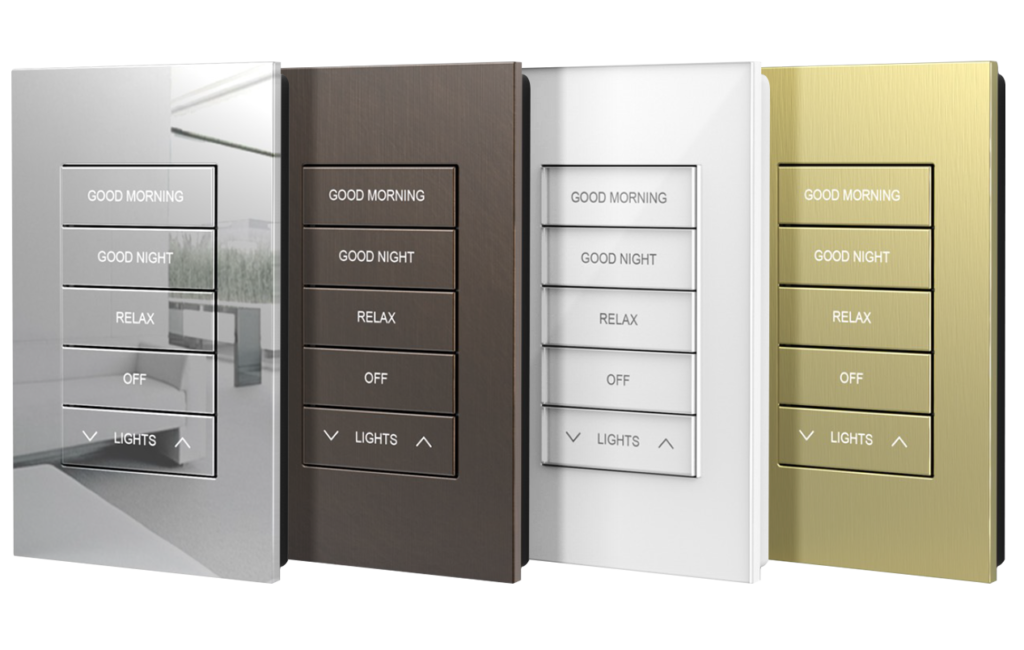
Horizon keypads prioritise clean design featuring improved colour, finish, and alignment in visually appealing layouts — with careful attention to everything from the ergonomics of the device to its ultimate fit and finish. The result is something that looks like it belongs in the space, not something that was added to it.
The latest generation goes further still. Crestron's Horizon keypads and dimmers now offer four premium metal finishes — brushed brass, dark nickel, dark bronze, and brushed black — alongside a modern, minimalist faceplate and modular button design to complement any interior.
Custom engraving lets you label buttons with icons or text that actually make sense for how you live — "Good Morning," "Movie Night," "Away" — rather than generic symbols nobody remembers. Deep functionality is built into the backlighting too, with colour temperature adjustable to suit the room's ambient light, and a dim-to-warm mode that automatically softens the backlight as the room darkens.
For anyone renovating — especially those investing in quality finishes, joinery, and fittings — the idea of a keypad that you'd actually choose as part of your interior design rather than grudgingly accept is a meaningful one. This is what Crestron does exceptionally well.

Ajax LightSwitch — Smarter Lighting That's Actually Beautiful

The humble light switch is one of the most-touched objects in any home, and yet it's almost always an afterthought. Ajax has changed that.
The Ajax LightSwitch features a spacious touch-sensitive panel that responds instantly to taps or contactless gestures — hold your hand 15mm from the device and the light turns on. Soft LED backlight makes it easy to find in the dark, and it requires no neutral wire.
LightSwitch is available in one-gang, two-gang, and two-way models, with replaceable face panels in eight colours: white, fog, grey, graphite, ivory, oyster, olive, or black. Whether your home leans contemporary, coastal, or classic country, there's a finish that fits.
This isn't a cheap smart switch you'd find in a hardware store. Ajax earned its first Red Dot Award — one of the most recognised design awards in the world — with the LightSwitch and Outlet family recognised specifically in the Interior Design Elements category. That's a security and automation company being judged on design merit against products that are only supposed to look good. And winning.
Beyond aesthetics, it integrates directly into the Ajax security and automation ecosystem — so your lighting, alarm, and sensors all communicate through a single platform, managed from one app.
Ajax Lightswitch further infomation

Ubiquiti UniFi Access Points — Tech That Disappears Into the Ceiling
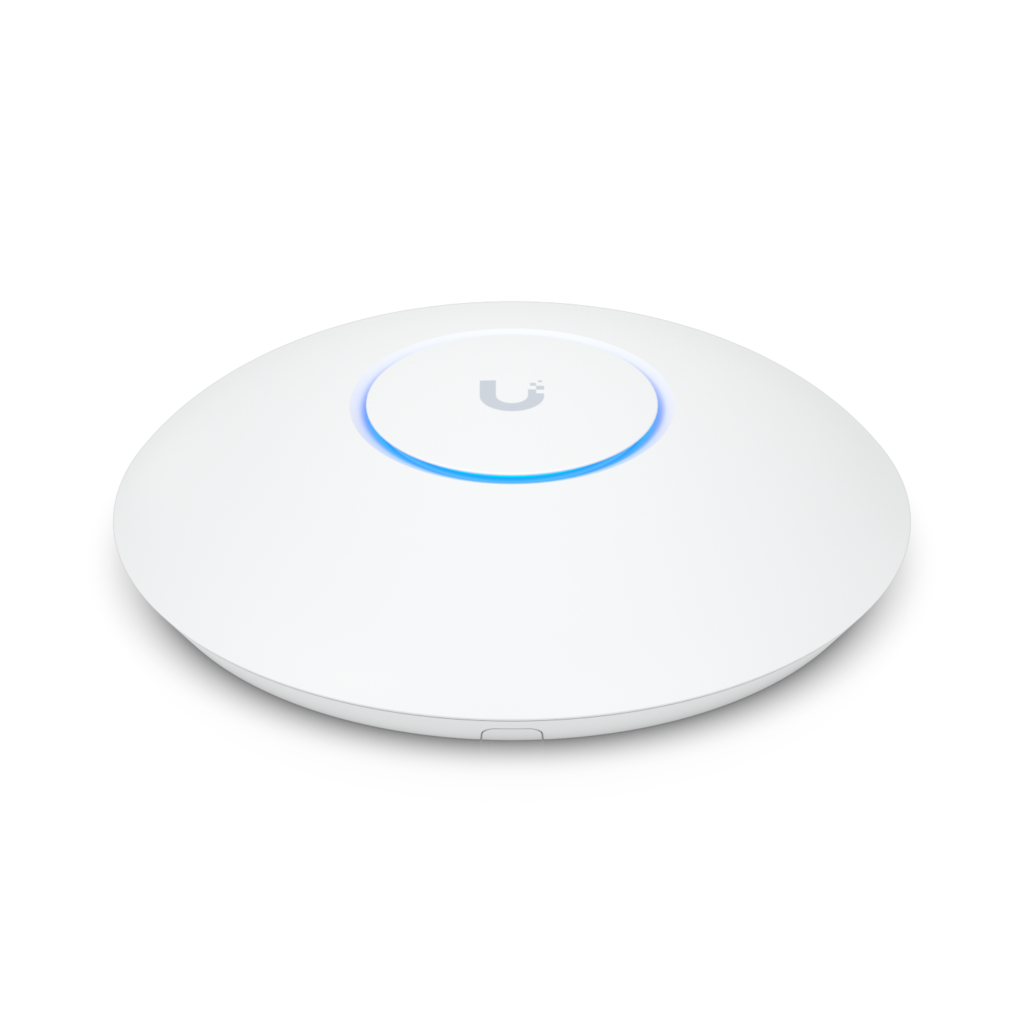
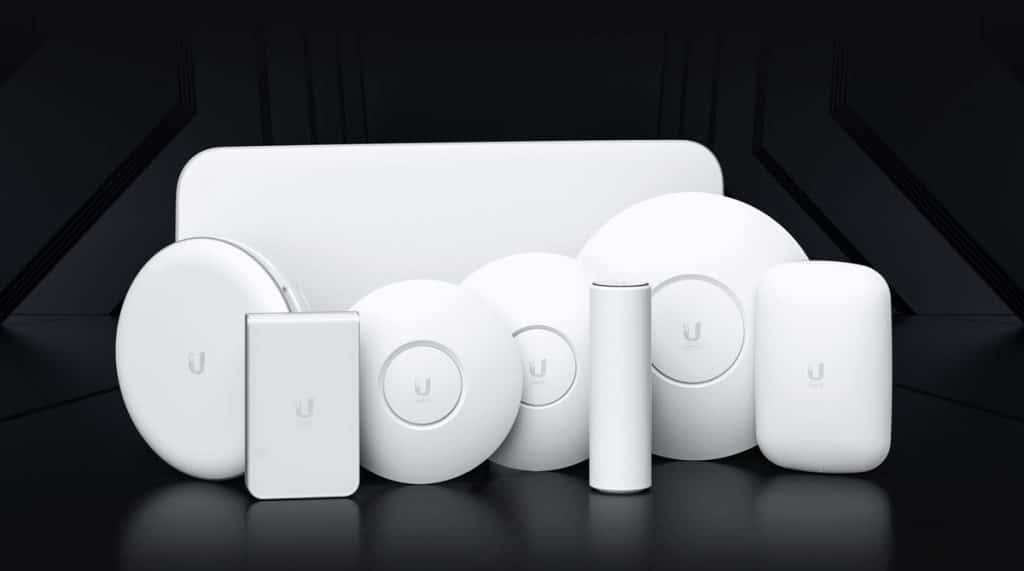
WiFi access points have traditionally been an eyesore — white plastic discs reluctantly tolerated on ceilings and walls. Ubiquiti's UniFi range changed the conversation by designing hardware that's genuinely discreet.
The UniFi U7 Pro ceiling-mounted access point, for example, sits flush, low-profile, and clean — the kind of thing that blends into a freshly painted ceiling without drawing any attention whatsoever. Ubiquiti's commitment to aesthetics is evident in a design that is both sleek and functional, promising seamless integration into any environment.
For outdoor installations, the UniFi U6 Mesh outdoor access points extend that same design discipline outside — weatherproof, purpose-built, and considerably more considered in their appearance than the industrial-looking alternatives.
The philosophy across the UniFi range is consistent: professional-grade performance in a form factor that respects the spaces it lives in. For a renovated home or a well-designed commercial fitout, that matters.

Ubiquiti G6 Cameras — Surveillance That Doesn't Look Like Surveillance

The G6 camera range is a good example of what happens when a manufacturer takes industrial design seriously.
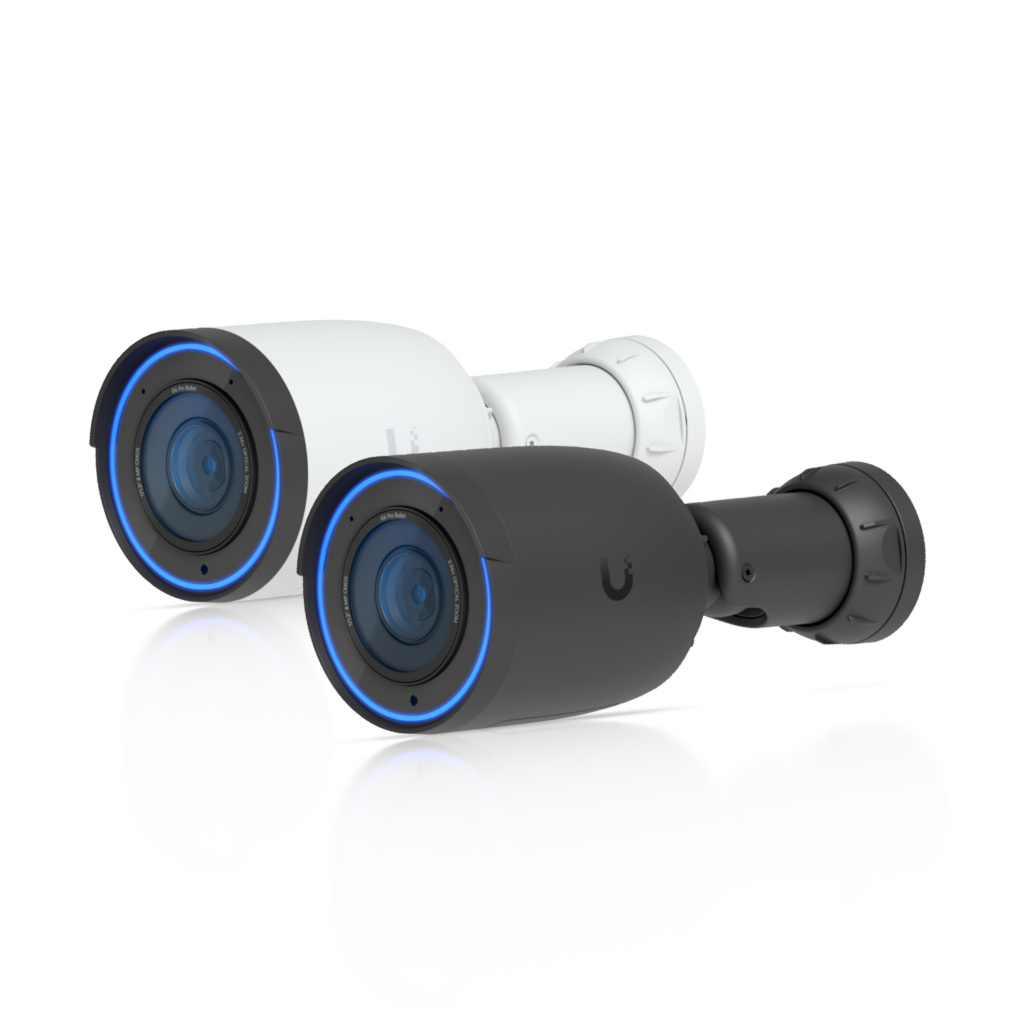
The G6 Turret, in particular, is compact, low-profile, and finished in clean white — designed to sit unobtrusively under a soffit or on a wall without announcing itself. It's a meaningful departure from the bulky, utilitarian cameras that have long dominated the surveillance market.
The outdoor G6 Bullet is more visible by nature — it's designed for perimeter use where some degree of visible deterrence is actually desirable — but even here, the lines are clean and the hardware is considered. These cameras deliver pro-level performance at a price point that no longer requires choosing between image quality and cost.
And because the entire UniFi ecosystem uses the same app, the same interface, and the same management platform, everything from your WiFi to your cameras to your access control sits in one cohesive, well-designed digital environment. Tidy hardware, tidy software, tidy installation.
U6 information here

Ajax Security Sensors — Protection That Respects Your Interior

One of the most common hesitations people have about installing a security system is visual: they don't want sensors stuck to their doorframes or motion detectors screwed awkwardly into corners.
Ajax has addressed this head-on. Ajax devices feature sleek, minimal lines that complement modern residential and commercial spaces without the bulk and clutter of traditional sensors. The motion detectors, door sensors, and keypads are designed to sit quietly in a space — present and purposeful, but not intrusive.
Ajax Systems was recognised as Best Smart Home Security Equipment Manufacturer 2024 by the Security Awards in the UK — and that recognition extends beyond functionality to the considered design of every device in the ecosystem. In 2025, Ajax received 18 international awards spanning regions from Australia to North America and Southeast Asia.
For a renovated home where the finishes matter, knowing that your security system won't undermine them is genuinely reassuring.

The Installation Makes the Difference

Here's something that doesn't always get said enough: even the most beautifully designed products can look terrible if they're installed poorly.
Cable management, mounting position, alignment, height — these details are what separate a professional installation from one that was just "done." At The Techery, we take the installation as seriously as the product selection. Cables are concealed. Devices are positioned intentionally. Everything is clean, considered, and finished to a standard we'd be proud to show off.
That's as true for a single access point in a hallway as it is for a full smart home build. The technology should look like it was always meant to be there.

Thinking About a Renovation This Spring?

If you're refreshing your home — new kitchen, updated living areas, outdoor entertaining space, new build — the best time to think about your technology is before the walls go back on. It's much easier to run cables, plan access point positions, and design entry systems during a renovation than after.
We're happy to walk through a project at any stage and give you an honest picture of what's possible, what's practical, and what will look and work beautifully for years to come.
Come and visit us at Shop 5, The Mill, Bowral, call us on 02 4883 6781, or reach out through our website.
— The Techery Team

Security Camera Installation in the Southern Highlands — Professional, Licensed, Local

5 minute read

There's a moment most property owners have had — usually after something goes wrong.
A parcel disappears from the front step. Someone lets themselves through a gate they shouldn't have. You come back from a week away and something feels off. Or you simply realise that you have no idea what happened on your property overnight, and you'd really like to.
Surveillance cameras have been around for decades, but what's available today is genuinely different from the grainy, hard-to-access, complicated-to-manage systems of the past. Modern surveillance is sharp, intelligent, and designed to work for you — not just sit there recording footage you'll never find when you actually need it.
Here's what you need to know, and how we think about it at The Techery.

The Real Problem with Most Camera Systems

Walk into any hardware or electronics store and you'll find shelves of cameras. Wireless, solar-powered, cloud-connected, affordable. And plenty of them do a basic job.
But basic is often where the problems start.
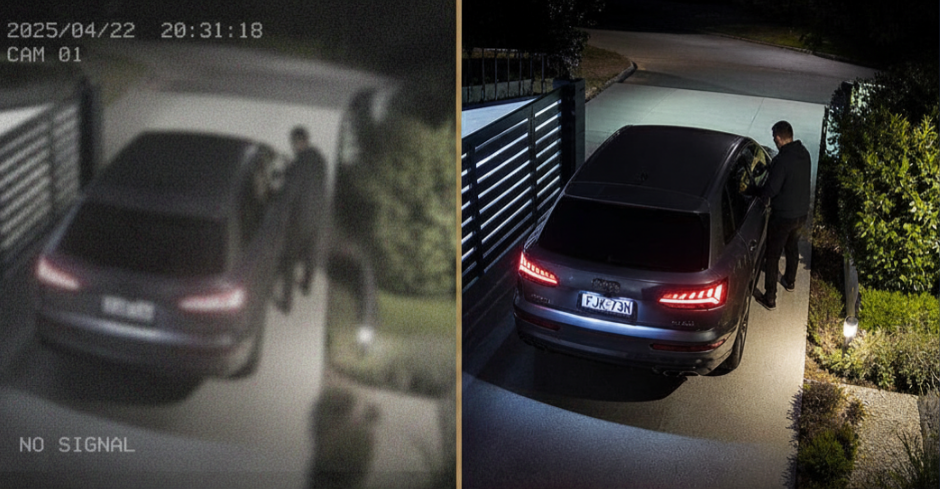
Consumer-grade systems are typically designed to be sold, not designed to be useful. The image quality looks impressive in the box, but degrades significantly at night or in bright sunlight. The motion detection triggers on every passing car or blowing leaf. The footage is stored in the cloud — on someone else's server — behind a monthly subscription you keep paying whether you use it or not. And when you actually need to find a specific clip from three days ago? You're scrolling through hours of low-quality alerts hoping to spot the moment that matters.
We design systems that solve these problems before they occur.

The Hardware We Trust: Ubiquiti G6 Cameras

At The Techery, our surveillance installations are built on the Ubiquiti UniFi Protect platform, and the current standout in that lineup is the G6 camera series.
At the heart of every G6 camera is a 1/1.8" 8-megapixel image sensor, offering crisp 4K resolution and outstanding low-light performance — with lenses meticulously crafted to ensure exceptional clarity in challenging conditions. In plain English: these cameras see clearly in the dark, in bright glare, and at the distances that actually matter on a real property.
Beyond the optics, that same sensor is powered by a multi-TOPs AI engine, enabling advanced analytics like face ID and licence plate recognition — paired with Protect's EdgeAI solutions to unlock enhanced video retrieval and person re-identification.
What this means practically is that your system isn't just recording — it's understanding what it sees. It can tell the difference between a person and a possum. It can recognise a vehicle you've flagged. It can alert you specifically when a person enters a defined zone after dark, rather than sending you a notification every time the wind moves a branch. That distinction matters enormously when you're trying to manage alerts on a busy property without becoming desensitised to them.
The G6 range includes multiple form factors — turret, bullet, dome, and instant — each suited to different mounting positions and use cases. The G6 cameras deliver pro-level performance without the pro-level price tag, with features that used to be reserved for top-tier devices now available in the standard lineup.

Local Storage vs Cloud — This Actually Matters

One of the most important decisions in any surveillance system isn't which cameras you choose — it's where your footage lives.
Most consumer camera brands default to cloud storage. Your footage leaves your property, sits on a third-party server, and typically comes with a monthly fee to access it. Beyond the ongoing cost, there are real questions about who controls that data — and what happens to it.
UniFi Protect takes a different approach entirely. All video recordings are stored locally on your UniFi OS Console — you are in full control of your data retention, storage configuration, and access policies. Ubiquiti cannot view, store, or access your video streams at any point.
Your footage stays on your property, on hardware you own. Whether you run 4 cameras or 40 — licensing is still zero. UniFi Protect handles all AI and recording on your local NVR, eliminating cloud fees, subscriptions, and paid AI add-ons.
You can still view everything remotely from your phone, anywhere in the world — but through an encrypted connection back to your own system, not through a third party's cloud. Local storage ensures high-speed access and privacy, while cloud-based management gives you control from anywhere.
For rural and regional properties in particular, this architecture matters. You're not dependent on a cloud service staying operational, or a subscription price staying affordable. The system works because your hardware works — full stop.

Tailored Design Makes All the Difference

A camera in the wrong place is almost as useful as no camera at all.
Before we recommend a single piece of hardware, we look at your property properly. Where are the entry points? Where are the blind spots? Where does lighting — or the lack of it — create challenges? What are you actually trying to achieve — deterrence, evidence capture, monitoring remote buildings, or all three?
The answers shape everything: camera selection, mounting positions, field of view, storage sizing, and how alerts are configured. A rural property with a long driveway and multiple outbuildings needs a completely different design to a suburban home with one street frontage. A retail business needs different coverage to a short-term rental property.
This is why we don't offer packaged surveillance kits. We design each system specifically for the property and the person who owns it.

What About Night Vision?

Night vision is where cheaper systems consistently let people down — and it's one of the most common pain points we hear from people who've bought something off the shelf and been disappointed.
The G6 cameras use infrared illumination for reliable night vision in complete darkness, and their large image sensor handles low-light conditions significantly better than smaller-sensor alternatives. The footage is clear, detailed, and actually usable — not the washed-out, grainy blur that makes consumer night footage so frustrating.
For properties where infrared isn't sufficient — very long driveways, wide paddock entries, commercial perimeters — we look at supplementary lighting solutions or cameras with built-in white light illumination to ensure the footage captured is genuinely evidential.

Licensed, Local, and Here for the Long Term

This is worth saying clearly: in NSW, installing a commercial or residential security system isn't something anyone can legally do without the right licensing. It requires a licensed security technician.
The Techery holds the appropriate security licences for surveillance and security installations. Every system we design and install is done to a professional standard, legally and correctly — not just plugged in and left to figure itself out.
We know these systems in depth — from camera placement and cabling through to configuration, alert management, and long-term support.
And because we're local — based in Bowral, servicing the Southern Highlands and surrounds — we're not a faceless company you'll struggle to reach when you need something adjusted six months down the track. We look after our installations, and we look after our customers.

Peace of Mind, Done Properly

Whether you're watching over a family home, a rural property with multiple buildings, a short-term rental, or a small business — a well-designed surveillance system is one of those things that quietly earns its keep every single day.
You don't think about it. You don't manage it. You just know it's there, doing its job, and that if you ever need it, the footage will be clear, accessible, and exactly where you'd expect to find it.
If you'd like to talk through what the right solution looks like for your property, we're happy to start with a conversation. Come and see us at Shop 5, The Mill, Bowral, call us on 02 4883 6781, or reach out through our website.
— The Techery Team
Smart Home Technology Made Simple — For Southern Highlands Homes of Every Kind

⏱ 4 minute read

We hear some version of this almost every week.
"I wouldn't even know where to start."
"I'm too old for all that stuff."
"Our place isn't fancy enough for smart home technology."
"I just don't want to have to learn something new."
And honestly?
We get it. The way smart technology is marketed — with jargon, flashing dashboards, and the assumption that everyone already knows what a "hub" is — makes the whole thing feel like it's designed for someone else. Someone younger, or more technical, or with a lot more patience for instruction manuals.
But here's what we know from working with real people across the Southern Highlands every single day: the technology itself isn't the hard part. The hard part is finding someone who will actually sit down with you, explain things in plain English, and make sure it all works simply before they leave.
That's what we do.

You Don't Need to Be Tech-Savvy — You Need the Right Guide

Smart technology has a bit of an image problem. The industry has spent years talking about features, specifications, and ecosystems — when most people just want to know: will this actually make my life easier?
The answer, when it's done properly, is yes. Genuinely, noticeably, every-day yes.
But "done properly" is the key phrase. The difference between a smart home that feels effortless and one that feels like a constant source of frustration almost always comes down to how it was designed, installed, and set up for the person actually living in it.
Research consistently shows that the biggest barrier to people adopting smart technology isn't the technology itself — it's the lack of familiarity, and the feeling that the home might become unfamiliar or difficult to navigate. In other words, people aren't scared of technology. They're scared of feeling lost in their own home.
That's a completely reasonable concern. And it's one we take seriously with every installation we do.

What "Simple" Actually Looks Like

Let us paint a picture of what smart technology looks like when it's set up for a real person — not a tech enthusiast.
For the couple who just want the lights to stop being a drama: One button beside the bed turns everything off. Not each room separately, not an app, not a voice command — just one button. Done. That's it. Goodnight.
For the busy family who keeps forgetting to lock the front door: The door locks itself at a set time each evening. Their phones get a quiet notification confirming it. Nobody has to check.
For the person who finds the TV remote confusing enough already: One touch on a simple panel dims the lights, closes the blinds, and turns the TV on — already set to the right input. They didn't touch three remotes. They didn't open an app. They pressed one thing.
For the older homeowner who wants to stay independent longer: Motion-triggered lighting in the hallway so they're never walking in the dark. A video doorbell that rings their phone so they can see and speak to whoever's at the door without getting up. Simple, practical, and genuinely useful every single day.
None of these require technical knowledge to use. They just require someone who knows how to set them up properly.

"But What If Something Goes Wrong?"

This is one of the most common questions we hear — and it's a fair one.
The honest answer is: things do occasionally need attention, just like any appliance in your home. But the systems we install are professional grade, designed to be stable and reliable, not the kind of consumer gadget that needs a firmware update every other week and stops working when the app changes.
And when something does need looking at, you call us. We're not a call centre in another state. We're a local team, based right here in Bowral, and we look after our customers long after the installation is done.
That ongoing relationship matters to us. We're not interested in installing something, handing you a manual, and disappearing. We want you to feel confident and comfortable with whatever we put in your home — and we'll take the time to make sure that's the case.


You Don't Have to Do It All at Once

Another thing worth saying clearly: smart technology doesn't have to be an all-or-nothing decision.
Some people start with a single room. A smarter lighting setup in the living room, or a video doorbell at the front entry. They live with it for a while, get comfortable, and then add to it when they're ready. Others come to us with a full renovation or new build and want everything designed from the ground up.
Both are completely fine. We work with where you are, not where we think you should be.
The systems we use are designed to grow with you. What you start with today can be added to, adjusted, and expanded over time — without starting from scratch.

A Conversation, Not a Sales Pitch

If you've read this far and thought "that actually does sound manageable" — that's the reaction we were hoping for.
We're not here to dazzle you with technology for technology's sake. We're here to understand how you live, what would genuinely make your day easier, and whether there's a solution that fits. Sometimes the answer is a full smart home setup. Sometimes it's one simple thing that makes a big difference. Either way, the conversation starts the same.
Come and see us at Shop 5, The Mill, Bowral, give us a call on 02 4883 6781, or reach out through our website. No pressure, no jargon — just a friendly chat with the locals who do this every day.
— The Techery Team

Professional WiFi Installation Across the Southern Highlands — Indoors, Outdoors and Beyond

The cooler months have a funny way of reminding us where our WiFi doesn't reach.
Suddenly you're working from home more, the kids are inside doing schoolwork, someone's trying to stream Netflix in the back bedroom, and your smart home devices are dropping offline because the signal doesn't quite make it past the kitchen wall. Or maybe you're heading out to the shed to get some work done and your phone disconnects the moment you step outside.
Sound familiar?
May is actually a brilliant time to sort out your WiFi properly — before the fire's on and everyone's settled in for the season. Here's what that can look like, and why it's worth doing right.

Why Your Router Alone Usually Isn't Enough

Most people's internet setup looks something like this: a modem-router sitting near the front door or in a hallway cupboard, doing its best to push a signal through walls, ceilings, and across large distances. For a small apartment, that's probably fine. For a Southern Highlands home — especially one with thick stone walls, multiple levels, a home office, or a property that extends to a shed, garage, or granny flat — it almost never is.
The problem isn't your internet connection. It's that your WiFi signal is trying to do too much from one single point.
And no matter how expensive your router is, physics will always win.
The solution isn't a better router. It's a better system.

What a Proper WiFi System Actually Looks Like

At The Techery, we design and install WiFi infrastructure using Ubiquiti's UniFi platform — the same professional-grade system used in hotels, office buildings, and enterprise campuses, now accessible and practical for homes and small businesses.
Instead of one device trying to cover everything, a UniFi system uses multiple access points placed strategically across your property. Each one is wired back to your network (where possible) for maximum reliability, and they all work together seamlessly — so your phone or laptop moves between them without dropping out, exactly like a professional building does it.
For outdoor coverage, we commonly deploy the UniFi Mesh and Mesh Pro's — both weather-rated, these access points are built specifically for outdoor and extended coverage applications. These indoor/outdoor access points are designed for mesh applications, making it well suited to the Southern Highlands' variable conditions.
These are purpose-built outdoor units that can handle a lot of devices, in all weather, and integrate cleanly with everything else on your network.

Sheds, Garages, and Paddock Buildings — Yes, WiFi Can Reach There Too

This is one of the most common conversations we have with rural and semi-rural property owners across the Highlands.
Whether it's a workshop, a machinery shed, a studio, a granny flat, or a paddock building — if there's power, there's usually a way to get reliable WiFi there. In most cases we're running a cable from your main building out to the structure and mounting an access point on the outside wall or under the eave. The result is full-strength WiFi at the shed that's on the same network as your house, with no separate logins, no dead zones in between, and no dropouts.
It's also the foundation that makes other technology possible out there — security cameras, smart lighting, intercom systems, even a UniFi Access reader on the shed door if you want to get fancy about it.

Home Offices — Built for How You Actually Work Now

The home office has gone from being a nice-to-have to a genuine necessity for a lot of families across the Highlands. And yet the WiFi supporting it is often an afterthought — a slow connection, an extender plugged into a wall, or a long Ethernet cable someone's tripped over twice.
A properly placed access point in or near your home office makes a real difference. Video calls stay stable. Large file uploads don't stall out. You're not competing with the rest of the household for bandwidth. And because UniFi lets us manage everything centrally, we can also set up separate networks — so your work devices stay on their own network, away from the kids' tablets and the smart TV.

Event WiFi — When You Need Reliable Connectivity for a Crowd

We also provide temporary WiFi solutions for events across the Southern Highlands — markets, weddings, corporate functions, pop-up venues, and community events where reliable connectivity for a large number of people is genuinely important.
The challenge with events isn't just coverage — it's capacity. Consumer-grade equipment simply can't handle hundreds of devices connecting at once without grinding to a halt. UniFi's access points are designed for exactly this kind of high-density environment, and we configure them specifically for the event: isolated guest networks, bandwidth management, and the kind of setup that actually holds up when 200 people try to post to Instagram at the same time.
If you're planning an event and WiFi is on the checklist, it's worth having a conversation with us early — the planning and infrastructure side of it takes a little lead time to do properly.

It's Worth Doing Once, and Doing Right

The thing we hear most often after a proper WiFi installation is: "I can't believe we put up with the old setup for so long."
Dead zones disappear. Dropped calls stop. Smart home devices that were forever going offline start behaving. And the whole property — inside and out — just works the way it should.
If you've been frustrated by patchy coverage, a shed that can't get a signal, a home office that buffers at the worst times, or an event coming up that needs reliable connectivity — give us a call.
We're at Shop 5, The Mill, Bowral, reachable on 02 4883 6781, or you can get in touch through our website. We'll take a look at your property and put together something that actually fits.
— The Techery Team